Curiosity
WebRTC Deepdive
Zoom, Discord, Google Meet, Canva mouse pointers, multiplayer games, MS Teams.
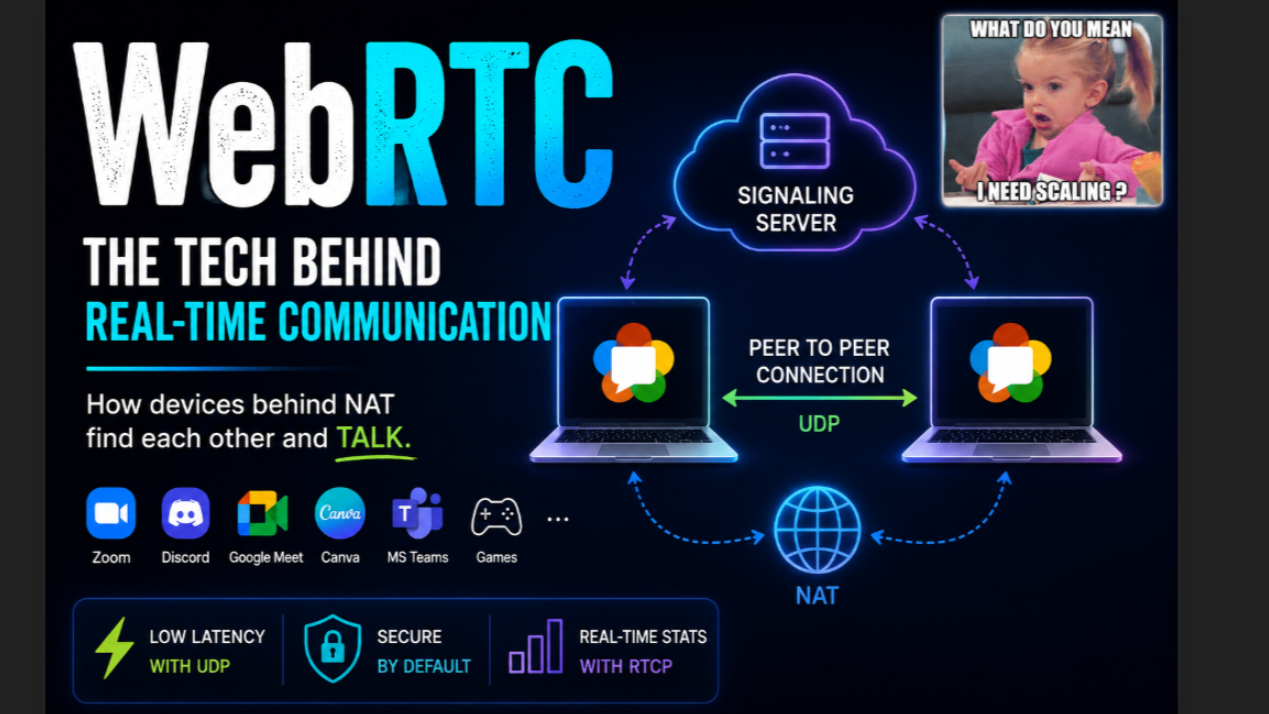
Zoom, Discord, Google Meet, Canva mouse pointers, multiplayer games, MS Teams.
All of these use WebRTC in one way or another.
WebRTC is an open-source project started by Google in 2011. Later, most browsers had it built in, so no plugins or installs are required.
In this blog we will understand webrtc with the help of a common story where you have a meeting with your stakeholders and manager joins to steal all the credit and throw you under the bus for extra work. (I’m just making this up, remember im unemployed as of now)
The simplest way to think about it is:
HTTP is a transaction. You send a request, you get a response, and you're done.
WebRTC is a session. You negotiate once and keep talking.
That makes it perfect for things like video calls, voice calls, multiplayer games, live collaboration, file sharing, and anything else that needs low-latency communication.
Why Not TCP? Before we go further, take a guess.
What transport protocol do you think WebRTC primarily uses?
TCP or UDP?
If you picked UDP, you're right.
Imagine you're on a video call and a single video frame gets lost.
Would you rather:
Wait for it to be retransmitted (TCP)? Or just move on to the next frame immediately (UDP)?
For real-time communication, waiting is usually worse.
A mouse pointer location from 500ms ago is useless now.
A video frame from 200ms ago is already outdated.
Guaranteed delivery sounds great until it starts introducing latency and overhead.
Sometimes it's simply better to let the packet go.
Article content
High-Level Flow At a very high level, the flow looks something like this:
Article content Under the hood, a few protocols work together to make the magic happen.
Protocols Involved
- Session Description Protocol (SDP) This is where both sides introduce themselves.
SDP describes things like:
Audio codecs Video codecs Supported resolutions Bitrates Encryption capabilities Other media capabilities
Think of it as:
"Here's what I can do. What can you do?"
Both sides exchange capabilities and agree on common settings.
- ICE (Interactive Connectivity Establishment) Once both peers know what they can do, they need to figure out how to reach each other.
This sounds easy until you realize most devices are not directly reachable on the internet.
Your laptop usually sits behind a router using a private IP address.
Same for the other participant.
So how do two devices that cannot directly see each other establish a connection?
That's ICE's job.
Article content ICE is actually a framework that uses a few other protocols internally, which we'll discuss shortly.
- DTLS (TLS for UDP) If you've heard of TLS (the thing behind HTTPS), DTLS is basically its UDP cousin.
Its job is to:
Authenticate peers Negotiate encryption keys Establish a secure connection
After this step, nobody in between should be able to read the media being transmitted.
TLS and DTLS are cryptographic protocols that protect data privacy and integrity over networks. They both perform encryption, authentication, and key exchange, but serve different network environments
- SRTP (Secure Real-Time Transport Protocol) This is where the actual audio and video packets flow.
Once the connection is established and encrypted, SRTP carries:
Voice Video Screen share streams
This is the highway your media travels on.
- RTCP RTCP doesn't carry media.
Instead, it carries information about the media.
Things like:
Packet loss Latency Jitter Synchronization information
It helps participants understand how healthy the connection is.
Think of it as the monitoring dashboard of the call.
The NAT Problem You want to have a video call with your stakeholders and manager.
The manager is, of course, ready to take all the credit.
Now here's the problem.
Neither of your laptops has a public IP address.
Why?
Because we simply don't have enough public IPv4 addresses for every device on Earth.
Instead, all of you sit behind routers using private addresses.
For example:
Your laptop has a private IP Your manager has a private IP Your stakeholders have private IPs
The router owns the public IP.
When you browse the internet, watch videos, or doomscroll, the router translates your private address into a public one.
This process is called NAT (Network Address Translation).
Article content This topic alone could become an entire blog series.
I've previously written blogs and made videos explaining concepts like NAT and ARP poisoning in much greater detail. DM if you need those and ill share it.
But for now, let's stay focused.
The meeting awaits.
TL;DR NAT translates your private IP into a public IP.
But The Problem Still Exists Even if NAT gives everyone internet access, we still don't know:
How do you reach the other participants? How do they reach you? Which address should they use?
This is where signaling comes in.
Step 1: Signaling Server Everyone first connects to a common server called a signaling server.
You can build one using WebSockets. Doesn't matter how you do it, JUST DO IT
The signaling server's job is simple:
Introduce participants Exchange connection information Get out of the way
It does not carry your video or audio.
Think of it as a matchmaker.
Article content
Step 2: STUN Each participant contacts a STUN (Session Traversal Utilities for NAT) server.
The STUN server helps answer:
"What public IP and port does the rest of the internet see me as?"
Article content After talking to STUN, every participant learns their public-facing address.
Step 3: Gather ICE Candidates Each participant now builds a list of possible addresses through which they might be reachable.
These are called ICE candidates.
Examples include:
Local addresses Public addresses discovered via STUN Other possible routes
Step 4: Exchange ICE Candidates All participants exchange ICE candidates through the signaling server.
The signaling server then steps aside.
Each peer starts trying different candidate combinations.
Whichever path works first wins.
The fastest successful route becomes the active connection.
Step 5: Secure Everything Once a path is found:
DTLS performs the encryption handshake SRTP starts carrying media
And that's it.
The meeting starts.
Your manager can now take your credit.
And the media is flowing directly between devices without involving the signaling server anymore.
But But .. …WebRTC Is More Than Video Calls Most people associate WebRTC with Zoom or Google Meet.
But it can transport much more than audio and video.
Examples include:
Multiplayer game data [where ur teammate lies about being 1hp] Cursor positions [where you can see ur grp mates doing no work as their cursor didn't move in 19 minutes while you do all the work] Collaborative editing Live whiteboards File transfers Sensor data Real-time dashboards
But But But... That Isn't Enough.
Article content Everything we've discussed sounds great.
Until you try to scale it.
The Scalability Problem Imagine a meeting with 5 people.
In a pure peer-to-peer setup:
Each participant uploads streams to every other participant.
That means:
You upload to 4 streams You download 4 streams This is rapid bandwidth growth !!
As participant count increases, things become painful very quickly.
Your internet connection eventually becomes the bottleneck.
Article content
Enter SFU To solve this, we use an SFU (Selective Forwarding Unit).
The name is pretty self-explanatory.
Instead of sending your stream to everyone:
You upload a single stream to the SFU. The SFU forwards it to everyone else.
Now:
Upload cost stays low. The server handles distribution.
You still download streams from others, but your upload burden is dramatically reduced.
This is how most modern video conferencing platforms operate.
SFUs Can Be Smart Too An SFU doesn't just forward packets.
It can also optimize streams.
For example:
If you're viewing 30 people in tiny squares on your screen, rendering everyone's 1080p stream makes little sense.
The SFU can:
Forward lower-resolution versions Adjust quality dynamically Save bandwidth Reduce CPU usage
Which means smoother meetings and fewer laptops sounding like jet engines.
Closing Thoughts I think that's enough WebRTC for one blog.
I'd love to do deeper dives into various protocols that I couldn't cover The goal of these blogs is simple:
I spend time learning something interesting, write it down, and hopefully help more people appreciate the technology we use every day without thinking about it.
If this blog results in even two DMs saying they learned something new, I'll consider that a success.
Bye, and thanks for reading.